















Quick answer: CutBay AI is a chat-based AI video agent that turns prompts, links, documents, spreadsheets, and uploaded media into editable videos. It is best for marketers, ecommerce sellers, educators, and business teams that need fast, repeatable video production without learning a complex editing timeline.
Most AI video tools still feel like editors with an AI button bolted on. You type a prompt, receive a rough draft, then spend an hour dragging clips around a timeline. CutBay takes a different approach: you describe what you want, provide source material, and chat with the AI to refine the result.
CutBay is built by the team behind FlexClip and positions itself as an AI video agent rather than a conventional video editor. Its core promise is simple: turn “anything”—an idea, blog post, Amazon product URL, PDF, spreadsheet, or folder of clips—into a share-ready video.
This review explains how CutBay works, what it does well, where it needs improvement, who should use it, and how it compares with FlexClip and other AI video tools.
What Is CutBay AI?
CutBay AI is a conversational AI video creation and editing platform that automates the path from source material to finished video. Instead of manually assembling scenes, users describe a goal, upload assets or paste a link, and instruct the AI through chat.
The platform handles several stages of production:
Understanding the creative brief.
Planning the video structure.
Producing scenes, narration, captions, visuals, and motion.
Updating the video through follow-up chat instructions.
CutBay supports input from ideas, documents, links, and media files. It can extract information and images from blogs, news pages, Amazon product URLs, and landing pages, then turn them into video content.
What Makes CutBay Different?
CutBay’s main differentiator is chat-based editing. Rather than searching through menus, you can ask for changes in natural language: shorten the intro, change the tone, add captions, replace a scene, or adapt the video for another platform.
That approach lowers the learning curve for people who do not want to become video editors. It also makes CutBay more suitable for teams that need volume—social clips, product promos, training videos, and internal communications—rather than frame-by-frame creative control.
Who Should Use CutBay AI?
CutBay AI is best for marketers, ecommerce brands, educators, and business teams that need to produce videos quickly from existing content. It is less ideal for filmmakers, advanced motion designers, or creators who need precise manual control over every frame.
CutBay explicitly targets these audiences on its website, positioning the tool for marketing, ecommerce, education, and business communication.cutbay
How Does CutBay AI Work?
CutBay works through a three-stage workflow: understand, plan, and produce. You provide a prompt and source material, the AI creates a video plan, then it generates a complete draft you can refine through chat.
Step 1: Start From Anything
You can begin with:
A written idea or creative brief.
A blog post, news article, landing page, or Amazon product URL.
A PDF, spreadsheet, presentation, or online document.
Uploaded video clips, images, and brand assets.
Talking-head footage that needs cleanup and enhancement.
This is one of CutBay’s strongest practical advantages. Many AI video generators start only with a text prompt. CutBay starts with the material you already have.
Step 2: Let the Agent Plan the Video
After receiving your input, CutBay helps shape the idea into a video structure. It can identify relevant stock resources, generate AI images, compose scenes, add narration, captions, charts, and motion graphics.
For a product URL, for example, it can pull product information and images, then create a promo-style video with benefits, visuals, and a call to action.
Step 3: Edit by Chatting
Once the draft exists, you refine it conversationally. CutBay says you can tell the AI what to change and see the video update instantly, without complicated tools or a steep learning curve.
Examples of chat instructions might include:
“Make the opening more attention-grabbing.”
“Shorten this to 30 seconds for TikTok.”
“Add captions and change the font to match my brand.”
“Use a more energetic voiceover.”
“Replace this scene with a product close-up.”
“Create a vertical version for Instagram Reels.”
What I Liked About CutBay AI
CutBay’s biggest strength is speed from existing content to usable video. It is especially valuable when the source material already exists—such as a blog post, product page, presentation, or folder of customer footage.
1. It Turns Existing Content Into Video
The URL-to-video and document-to-video workflows are the most compelling features. Instead of starting from a blank canvas, you can feed CutBay a blog post, landing page, product URL, PDF, or spreadsheet and ask it to create a video around that material.
This matters for SEO and content repurposing. A single article can become a YouTube explainer, a LinkedIn video, an Instagram Reel, and a TikTok without rebuilding the message from scratch.
2. Chat-Based Editing Reduces Friction
Traditional editors require you to learn timelines, keyframes, transitions, audio levels, and export settings. CutBay’s chat interface makes revisions more accessible to non-editors.
For a small business owner, that difference can be decisive. They do not need to learn Premiere Pro or DaVinci Resolve to create a decent product promo.
3. It Covers Many Video Formats
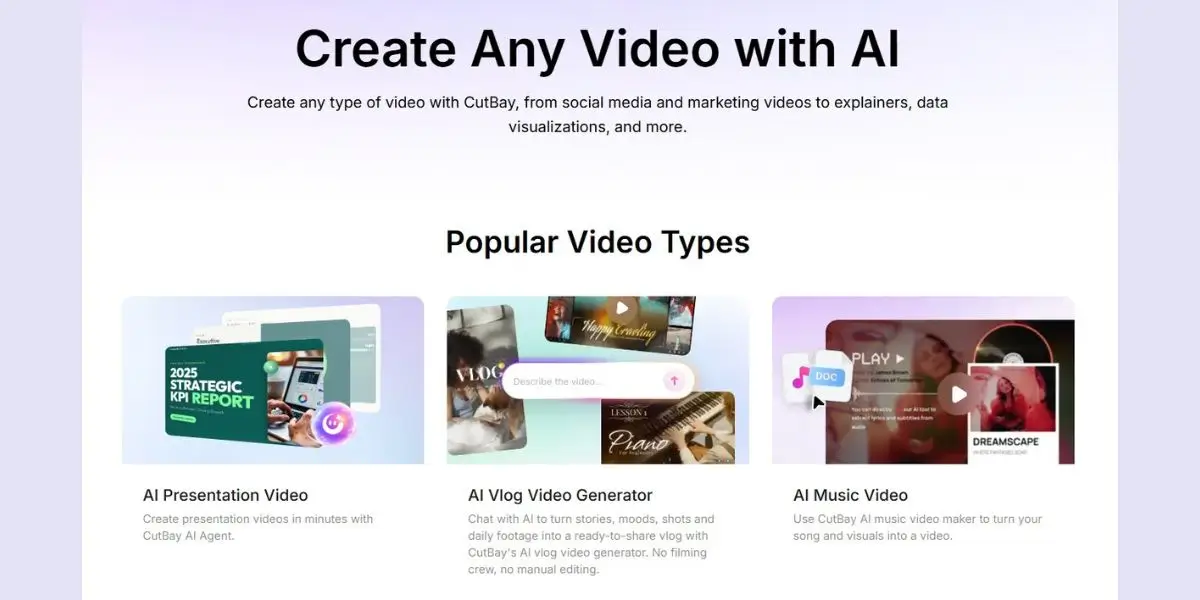
CutBay includes templates and workflows for ads, explainers, presentations, vlogs, music videos, slideshows, data visualizations, infographics, TikToks, Reels, YouTube videos, and YouTube Shorts.
That breadth makes it more than a single-purpose “text-to-video” tool.
4. It Is Useful for Data-Heavy Content
CutBay can turn reports, spreadsheets, and presentations into animated charts, graphs, dashboards, and infographic-style videos. This is a strong niche advantage for agencies, analysts, SaaS teams, and businesses that need to communicate numbers visually.
5. It Can Clean Up Talking-Head Footage
CutBay can remove filler words, silence, and retakes from talking-head videos, then enrich them with captions, B-roll, and motion graphics. That makes it useful for podcasters, course creators, founders, and anyone recording webcam content.
Pro tip: Start with a source asset that already contains a clear message—a strong blog post, a detailed product page, or a well-structured presentation. CutBay performs best when it has substance to work with, not just a vague one-line prompt.
What Could Be Better
CutBay is impressive for speed, but AI-generated video still requires human review. The tool can produce a strong first draft, but brand accuracy, factual accuracy, pacing, and visual quality still need a person’s judgment.
Potential Limitations
Creative control may feel limited: Chat-based editing is fast, but advanced editors may miss precise timeline control.
AI visuals need review: Stock assets and AI-generated images can look generic if you do not provide brand assets.
Voiceover quality varies by language and script: Test pronunciation, pacing, and tone before publishing.
Source-page extraction is not perfect: Product URLs, landing pages, and articles may contain layout elements or claims that need correction.
Brand consistency requires setup: Upload logos, fonts, colors, and approved messaging rather than relying entirely on AI choices.
Long-form videos need more oversight: The longer the video, the more important structure, pacing, and narrative flow become.
Expert insight: Treat CutBay as a video-production assistant, not an autonomous creative director. Give it a clear brief, source material, brand rules, and a human review step before publishing.
CutBay AI Features at a Glance
CutBay’s feature set is broad, but its most practical value comes from combining source-material repurposing with conversational revision.cutbay+1
CutBay vs. FlexClip: Which Should You Use?
Choose CutBay when you want an AI agent to create and revise a video from a prompt, link, document, or footage. Choose FlexClip when you want more hands-on control inside a familiar template-and-timeline editor.
Because CutBay comes from the team behind FlexClip, the tools are complementary rather than strictly competitive. Use CutBay to generate the first version quickly. Use FlexClip when you need to polish branding, adjust scenes manually, or maintain a more controlled editing workflow.
Step-by-Step: How to Create a Product Video With CutBay AI
This workflow is ideal for ecommerce stores, affiliate marketers, and brands promoting a product page.
Choose one product and one goal. Decide whether the video is meant to educate, drive traffic, generate add-to-carts, or support a launch.
Paste the product URL. Provide the Amazon listing, Shopify product page, or landing page so CutBay can extract relevant details and visuals.cutbay
Upload brand assets. Add your logo, product photos, customer reviews, brand colors, and any approved product footage.
Write a clear brief. Example: “Create a 30-second vertical TikTok ad for this product. Focus on the main benefit, include social proof, and end with a strong call to action.”
Select format and tone. Choose vertical video for TikTok or Reels, energetic voiceover for ads, or a more neutral tone for product education.
Generate the first draft. Let CutBay create the structure, visuals, captions, and narration.
Review every claim. Check product specifications, pricing, shipping claims, guarantees, and customer-review language.
Refine by chat. Ask for a stronger hook, shorter runtime, clearer CTA, different music, or a new scene order.
Create platform variations. Produce a 15-second TikTok version, a 30-second Reel, and a longer YouTube or landing-page version.
Publish and measure. Track hook rate, watch time, clicks, add-to-carts, and cost per result. Use performance data to improve the next prompt.
Example Prompt
Create a 30-second vertical TikTok ad for this product page.
Audience: busy professionals who want a simple solution.
Main benefit: saves time without complicated setup.
Tone: confident, friendly, modern.
Include: product close-ups, benefit-led captions, social proof, and a clear CTA.
Avoid: exaggerated claims, medical promises, and unsupported guarantees.
End with: “Tap to see why customers love it.”
Case Study: Repurposing a Blog Post Into a Video
Imagine a marketing agency publishes a 1,500-word article titled “7 Landing Page Mistakes That Reduce Leads.”
Without AI, repurposing it might require a writer to create a script, an editor to source visuals, a voiceover artist to record narration, and another editor to add captions and motion graphics.
With CutBay, the agency can:
Paste the article URL into CutBay.
Ask for a 60-second LinkedIn video summarizing the seven mistakes.
Ask for a 30-second vertical version for Instagram Reels.
Add the agency logo, brand colors, and a CTA to book an audit.
Review the generated draft for accuracy and tone.
Export both versions and schedule them alongside the original article.
The article becomes a multi-format asset instead of sitting on the blog waiting for organic traffic. This is where CutBay’s URL-to-video capability becomes genuinely useful.
How Good Is CutBay for Social Media?
CutBay is well suited for social media because it can create short-form formats from prompts, photos, videos, and product assets. It includes dedicated workflows for TikTok videos, Instagram Reels, YouTube Shorts, slideshows, and photo videos.
For social teams, the biggest benefit is iteration. You can generate one core message, then ask CutBay to adapt it into different lengths, aspect ratios, hooks, and platform styles.
However, do not expect every AI-generated social video to perform well automatically. The hook, first three seconds, visual variety, captions, sound choice, and call to action still determine performance.
Social Media Prompt Formula
Use this structure:
Create a [length] [platform] video about [topic].

Audience: [who it is for].

Goal: [awareness, traffic, leads, sales].

Hook: [specific attention-grabbing opening].

Key points: [two or three benefits].

Tone: [friendly, expert, bold, playful].

Visual style: [product footage, UGC, clean graphics, cinematic].

CTA: [specific action].
Is CutBay AI Worth It?
CutBay AI is worth trying if you need to produce marketing, ecommerce, educational, or business videos faster without becoming a video editor. Its strongest use case is turning content you already have—links, documents, presentations, and footage—into structured, editable videos.
It may not satisfy advanced editors who need precise manual control, but that is not its main purpose. CutBay is built for speed, accessibility, and iteration.
For a small business, agency, or content team, the value comes from reducing production friction. If CutBay can turn one blog post, product URL, or presentation into several usable videos in minutes, it can meaningfully increase content output without adding headcount.
TRY CUTBAY AI NOW!
FAQs
What is CutBay AI?
CutBay AI is a chat-based AI video agent from the team behind FlexClip. It turns prompts, links, documents, spreadsheets, and uploaded media into editable videos, then lets users refine the result through natural-language instructions.
Can CutBay turn a URL into a video?
Yes. CutBay can extract information and images from blogs, news pages, Amazon product URLs, and landing pages, then turn that material into a video.cutbay
Is CutBay AI good for beginners?
Yes. Its chat-based workflow is designed for people who do not want to learn complex editing tools. Users describe the change they want, and CutBay updates the video without requiring advanced timeline skills.
Can CutBay create TikTok, Reels, and YouTube Shorts?
Yes. CutBay includes dedicated workflows for TikTok videos, Instagram Reels, YouTube Shorts, slideshows, photo videos, and other short-form formats.cutbay
Is CutBay better than FlexClip?
It depends on the workflow. CutBay is better for fast AI-generated drafts and chat-based revisions; FlexClip is better for hands-on editing and template-based control. Many teams can use both: generate with CutBay, polish in FlexClip.
Next Steps
CutBay AI is most valuable when you stop treating it as a magic video generator and start treating it as a production assistant. Give it strong source material, a specific goal, brand assets, and a clear review process.
Start with one repeatable workflow: turn a blog post into a LinkedIn video, convert a product URL into a TikTok ad, or transform a presentation into an internal training video. Test the output, refine it with chat, measure performance, and build a prompt library around the versions that work.
If your team needs to publish more video without hiring more editors, CutBay is worth testing—especially for URL-to-video, document-to-video, and short-form social content workflows.