
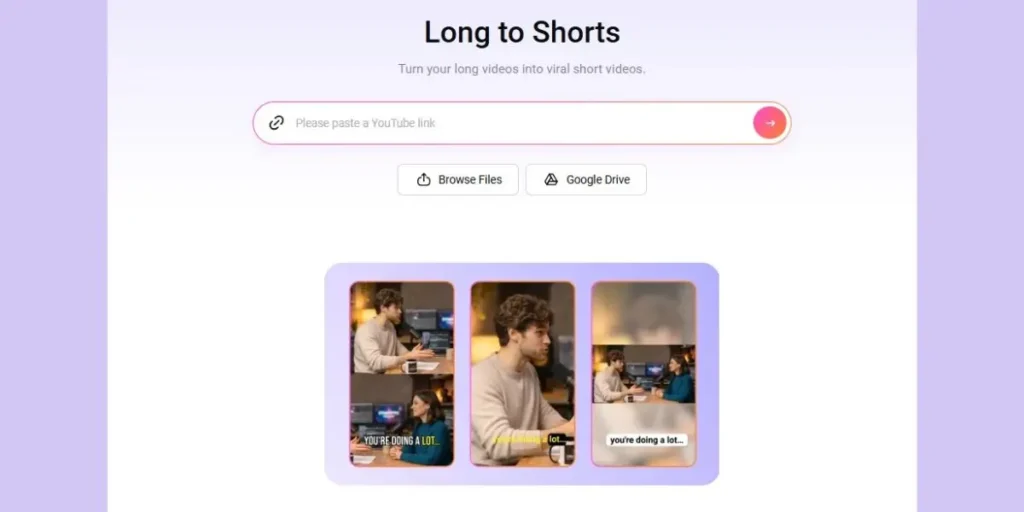

In the fast-paced world of social media, short-form video is king. Platforms like TikTok, Instagram Reels, and YouTube Shorts demand a constant flow of engaging content. But creating these clips from scratch is time-consuming. This is where the power of an AI long to short video converter changes the game. FlexClip’s dedicated tool is designed to solve this exact problem, allowing you to automatically repurpose long videos into bite-sized, viral-ready shorts in minutes.
This comprehensive guide will explore every angle of FlexClip’s AI clipper, showing you why it’s a top-tier solution for content creators, marketers, and businesses looking to scale their video output efficiently.
Why an AI Video Clipper is Your New Essential Tool
Before diving into FlexClip specifically, it’s crucial to understand the “why” behind the technology. Manually converting a 60-minute webinar or podcast into multiple short clips involves hours of work: watching the entire video, identifying highlights, cutting segments, reframing the aspect ratio, and adding captions.
An AI long to short video converter automates this tedious process. It uses artificial intelligence to analyze your video, identify the most engaging moments, and automatically generate perfectly formatted short clips. This not only saves hours of editing time but also unlocks a new content repurposing strategy, allowing you to get maximum mileage from every piece of content you create.
FlexClip’s AI Long to Short Video Converter: A Deep Dive
FlexClip has emerged as a powerful, all-in-one video creation platform, and its dedicated AI clipper tool is a standout feature . Unlike some simple cut-and-trim tools, FlexClip’s converter is built with a deep understanding of what makes a short video successful on social media.
Key Features That Set FlexClip Apart
1. High-Value Moment Extraction, Not Just Random Cuts
The core of the tool is its ability to automatically find the “viral” moments. It doesn’t just cut randomly; it analyzes the content to extract key points, highlight reel moments, or engaging snippets from various content types, including podcasts, interviews, webinars, and tutorials.
2. Smart Speaker Detection and Auto-Reframing
This is a critical feature for social media. Long videos are often horizontal, but shorts must be vertical (9:16 aspect ratio). FlexClip’s AI automatically detects the active speaker and dynamically reframes the video to keep them centered in the vertical frame. For conversations, it can intelligently switch to a split-screen layout, ensuring both speakers are visible. This eliminates the jarring “talking head cut in half” problem that plagues manually reframed videos.
3. Engaging Animated Subtitles by Default
Silent autoplay is the standard on many social feeds. FlexClip tackles this by automatically generating accurate, animated subtitles that are perfectly synced with speech. This feature is essential for keeping viewers engaged and conveying your message even when the sound is off. You can even translate these subtitles into other languages to reach a global audience.
4. A Built-in Editor for the Final Touch
Where FlexClip truly excels over basic clipping tools is its integrated, full-featured editor . After the AI generates your clips, you are not stuck with the raw output. You can:
-
Fine-tune the edit: Trim any segment further on the timeline.
-
Add branding: Insert your logo, brand colors, and custom fonts.
-
Enhance with media: Access a library of over 4 million stock videos and photos, plus thousands of music tracks to add b-roll or background music .
-
Level up with elements: Add social media icons, stickers, and overlays.
5. One-Click Publishing to Social Platforms
The workflow extends beyond creation. Once your clip is ready, you can publish it directly to YouTube Shorts and LinkedIn without leaving FlexClip. The AI can even write titles and descriptions for you, making distribution effortless.
Content Types You Can Effortlessly Repurpose
This tool isn’t limited to one type of video. It’s incredibly versatile and works exceptionally well for:
-
Podcasts: Turn a single episode into 5-10 highlight clips.
-
Interviews: Extract the most insightful Q&A exchanges.
-
Webinars & Tutorials: Share key steps, tips, and takeaways as standalone educational shorts.
-
Livestreams: Capture the funniest moments or most important announcements for recap videos.
-
Product Reviews & Demos: Create snappy, feature-focused clips for social media.
FlexClip vs. The Competition: Why It’s the Smarter Choice
While there are several tools like 2short AI on the market, FlexClip offers a unique combination of AI automation and manual control that provides significant advantages .
| Feature | FlexClip | 2short AI (Typical Competitor) |
|---|---|---|
| Import Options | YouTube Link, Local Upload, Google Drive | Primarily YouTube Link |
| AI-Driven Virality Score | Yes | No |
| Built-in Full Video Editor | Yes, with timeline, stock media, and brand kits | No, often limited to subtitle editing |
| Select Clips from Transcript | Yes, provides granular control | Not available |
| Social Publishing | Directly to YouTube Shorts and LinkedIn | Not available |
| Flexible Aspect Ratios | 9:16, 16:9, 1:1, 4:5, 3:4 | Typically limited to 9:16 and 1:1 |
FlexClip’s advantage is clear: it’s not just a clip generator; it’s a complete content creation and publishing hub. You don’t need to generate a clip in one tool and then import it into another for editing, which streamlines the entire process.
Step-by-Step: How to Convert Your First Long Video
Here’s how easy it is to get started with FlexClip:
-
Add Your Video: Go to the AI Long to Short Video tool. You can upload a video file from your computer, paste a YouTube video link, or import from Google Drive. The tool supports videos up to 2 hours long.
-
AI Analysis and Clip Generation: FlexClip’s AI will process your video, detect the active speaker, identify key highlights, and automatically generate multiple short clips with subtitles. You can customize the generation by specifying the clip type (highlights, key moments, Q&A) and desired duration range.
-
Review, Edit, and Publish: Browse the generated clips. Use the built-in editor to make any adjustments, add your branding, or change the music. When you are satisfied, you can download the clips or publish them directly to your connected YouTube Shorts and LinkedIn accounts with AI-written captions.
Best 2short AI Alternative? How to Turn Long Videos into Viral Shorts with FlexClip
In the fast-paced world of social media, short-form video is king. Platforms like TikTok, Instagram Reels, and YouTube Shorts demand a constant flow of engaging content. But creating these clips from scratch is time-consuming. This is where the power of an AI long to short video converter changes the game. While tools like 2short AI were early leaders, many creators are now looking for a more flexible and powerful alternative. FlexClip’s dedicated tool is designed to solve this exact problem, allowing you to automatically repurpose long videos into bite-sized, viral-ready shorts without the common limitations.
This comprehensive guide will explore every angle of FlexClip’s AI clipper, comparing it directly with 2short AI and showing you why it’s the superior choice for YouTubers, podcasters, educators, e-commerce brands, and media agencies looking to scale their video output efficiently.
Long to Shorts with FlexClip AI
Part 1: What is 2short AI and Where Does It Fall Short?
2short AI is an AI-powered tool designed to help users extract the best moments from long-form videos—like podcasts, educational content, and product reviews—and turn them into short clips for social media. Its core promise is speed: simply paste a YouTube link, and its AI analyzes the content, identifies engaging moments, and generates short clips with auto-captions.
Key Features of 2Short AI:
-
Auto Highlight Detection: Finds high-impact moments and converts them into shorts.
-
Smart Reframing: Uses facial tracking to keep active speakers centered in the vertical frame.
-
One-Click Animated Subtitles: Generates and styles captions automatically.
Critical Limitations of 2short AI:
However, as more advanced tools enter the market, 2short AI’s significant limitations have become a bottleneck for professional creators:
-
Notoriously Caption-Dependent: Its AI relies heavily on pre-existing captions or clean audio. For videos without CC or with noisy backgrounds, the tool often fails to interpret content and produce usable results.
-
YouTube-Only Import: It only supports importing via YouTube links, completely blocking direct uploads of local files or Google Drive content. This severely restricts flexibility for offline recordings or raw footage.
-
Limited Editing Capabilities: Customization ends largely with subtitles. There is no full timeline editor for deeper creative control, which means you often need a second tool.
These drawbacks raise an important question: Is there a smarter, more flexible tool for professional long-to-short video conversion?
Part 2: Why FlexClip is the Ultimate 2short AI Alternative
FlexClip is an all-in-one video editor with a powerful new Long-to-Short tool. While it automatically identifies and converts key moments just like 2short AI, the key difference is the unparalleled control and creative freedom it offers afterward. It’s a complete content creation and publishing hub, not just a clip generator.
2Short AI vs. FlexClip: Full Feature Comparison
| Category | FlexClip | 2Short AI |
|---|---|---|
| Import with YouTube Link | Yes | Yes |
| Local File Upload | Yes | No |
| Import from Cloud Drive | Yes (Google Drive) | No |
| Auto-detect Viral Clips | Yes | Yes |
| Smart Speaker Reframing | Yes, with solo & split-screen layouts | Yes, primarily center-cropping |
| AI Animated Subtitles | Yes | Yes |
| Full Video Transcript | Yes | No |
| Select Clips from Transcript | Yes, for granular control | No |
| Auto-Captions Language Support | 9 Languages | 26 Languages |
| Multiple Aspect Ratios | 9:16, 16:9, 1:1, 4:5, 3:4 | 9:16, 1:1, 16:9 |
| AI-Driven Virality Score | Yes | No |
| Built-in Full Video Editor | Yes, with timeline, stock media, brand kits | No (subtitle editing only) |
| Social Media Publishing | Yes (YouTube Shorts, LinkedIn) | No |
| Pricing | Free plan, Subscriptions, & one-time license | Free Starter plan; Paid from $9.90/mo |
Why FlexClip is Better Than 2short AI
FlexClip clearly provides more depth and flexibility. Here’s why it wins for professional creators:
-
Flexible Import Options: You’re not limited to YouTube. Upload videos from your computer, Google Drive, or paste a link, giving you full control over your content.
-
Enhanced AI Control: Go beyond auto-cutting. You can specify the clip type (highlights, key moments, Q&A, tutorial steps) and fine-tune the duration (under 30s, 30–60s, 60–90s, or 90–180s) for precisely tailored results.
-
Select Clips from Transcript: This is a game-changer. While 2Short.ai limits you to its choices, FlexClip lets you handpick clips directly from the full video transcript, ensuring you capture the most impactful moments.
-
Full Editing, Not Just Subtitles: Unlike 2Short.ai‘s limited editor, FlexClip offers a precise timeline editor with a full stock media library, brand kits, and more AI features like text-to-video and AI voice.
-
Direct Social Publishing: Instantly post your finished clips to YouTube Shorts and LinkedIn without leaving FlexClip, a feature completely absent in 2short AI.
Part 3: How to Use FlexClip AI to Create Viral Clips (Step-by-Step)
Here’s how easy it is to get started with FlexClip as your 2short AI alternative:
Step 1: Access the Long to Shorts Maker and Add Video
Open FlexClip’s Long to Shorts Maker. Upload a video file from your local storage, paste a YouTube video link, or import from Google Drive. The tool supports videos up to 2 hours long. This flexibility alone addresses 2Short’s biggest import limitation.
Step 2: Adjust the Long to Short Video Setting
Once loaded, FlexClip takes you to the setting page. Here, you guide the AI. Select the video language, aspect ratio (9:16 for TikTok/Reels), clip type (highlights, Q&A, etc.), subtitle style, and even the desired duration range for the output clips.
Step 3: Generate Viral Clips with One Click
Click the “Generate” button. FlexClip AI will analyze your video, smartly reframe it to keep speakers centered, capture the specified highlight moments, add animated subtitles, and produce multiple short clips.
Step 4: Preview, Refine, and Publish
Preview all the generated clips. This is where FlexClip truly outshines 2Short:
-
For quick selection: Choose your favorite clips and download them or publish directly to YouTube Shorts and LinkedIn with AI-written captions.
-
For granular control: Click “Trim” to open the full video transcript. You can manually select any text portion to generate a new clip from that exact moment.
-
For full creative editing: Click “Open in Editor” to use the full timeline. Here, you can add b-roll from the stock library, insert your brand kit, add text, transitions, and animated elements like subscribe buttons.
Long to Shorts with FlexClip AI
Frequently Asked Questions (FAQ)
What is an AI long to short video converter?
It is a tool that uses artificial intelligence to automatically analyze a lengthy video, identify its most important or engaging moments, and then convert those moments into multiple, shorter video clips that are properly formatted for platforms like TikTok, Instagram Reels, and YouTube Shorts.
How can I automatically turn a YouTube video into Shorts?
With FlexClip, the process is streamlined. You simply paste the YouTube video link into the converter. The AI scans the entire video, finds the best highlights, reframes them to a vertical 9:16 format, adds subtitles, and packages them as individual YouTube Shorts ready for download or direct publishing .
Will the AI-generated clips be in the correct format for TikTok and Instagram?
Yes, absolutely. The converter’s default setting is the 9:16 vertical aspect ratio, which is optimized for TikTok, Instagram Reels, and YouTube Shorts. You can also manually choose other ratios like 1:1, 4:5, or 16:9 as needed .
How many short clips can I get from one long video?
The number varies based on the length and content density of your original video. On average, you can expect between 5 and 10 highlight clips from a single long-form video. A longer, content-rich video will naturally yield more.
What kinds of videos work best with this AI tool?
The tool is particularly effective for content with clear speech and dynamic moments. Podcasts, interviews, webinars, tutorials, product reviews, educational courses, and testimonial videos tend to produce the best results.
Is there a free version of FlexClip’s AI converter?
Yes, FlexClip offers a free trial that allows you to test the long-to-short converter and experience how it works. The free version has some limitations on features, AI credits, and export quality (720p with a watermark), which are lifted with the Plus or Business paid plans .
How do I convert a YouTube video to Shorts?
Access FlexClip AI long to shorts converter, paste your YouTube link, and the AI scans the entire video, finds the best moments, and converts it into multiple clips automatically. You can then publish them to YouTube with AI-generated titles and descriptions.
Will the AI-generated clips be in the correct format for TikTok and Instagram?
Yes, the default ratio is 9:16, optimized for TikTok, Instagram Reels, and YouTube Shorts. You can also choose other ratios as needed.
How many clips can I generate from one long video?
You can generate multiple clips, normally 5-10, depending on its length and content. Longer, content-rich videos typically produce more highlights.
What types of videos work best with this tool?
Podcasts, interviews, product reviews, webinars, tutorials, and talks work especially well, but it also supports news, TV shows, testimonials, and more.
What video formats does the short video converter support?
It supports videos up to 2 hours long and you can upload files in MP4, MOV, and other standard formats.
Can I use the generated clips for commercial purposes?
Yes, you can, as long as you have the rights to the original video content.
Conclusion
FlexClip’s AI Long to Short Video Converter is more than just a simple cutting tool—it’s a strategic asset for anyone serious about video content. By automating the most labor-intensive parts of creating shorts, it frees you up to focus on strategy and storytelling. The combination of smart AI features like speaker detection and auto-reframing, paired with a robust built-in editor and direct social publishing, makes it a comprehensive and superior choice.
Instead of letting your long videos collect dust after one use, you can now turn them into a library of high-impact, viral-ready content that keeps your social feeds active and your audience engaged. Ready to work smarter, not harder? Give FlexClip’s AI clipper a try and see how easily you can repurpose hours of content into minutes of magic.