
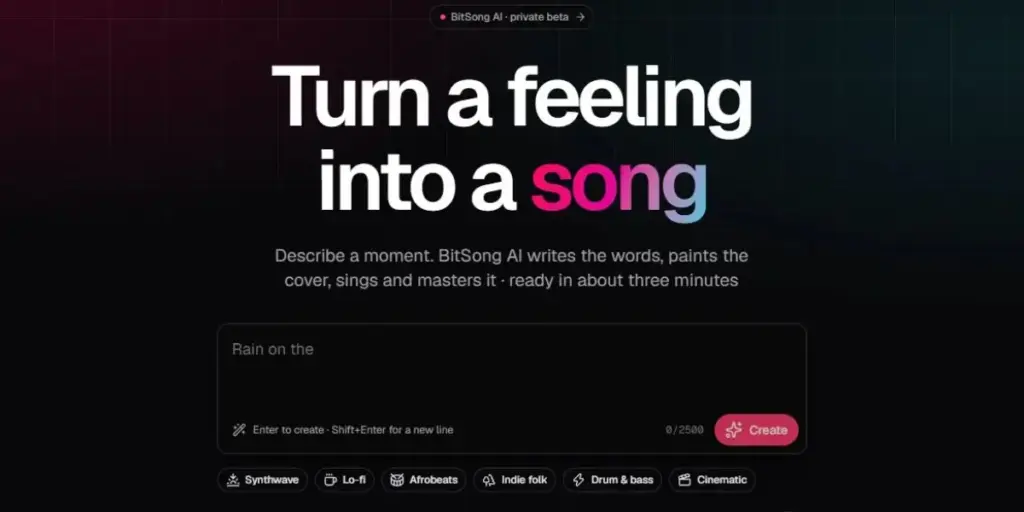

You’ve probably seen the pitch: Type a sentence and get a finished song with lyrics, vocals, cover art, and mastering in a few minutes. BitSong AI makes that promise and, for the most part, delivers. But before you sign up, fund a wallet, or build a release strategy around it, you should know the details that most promotional content skips: how the platform works, how much it costs, who owns your creations, and whether the video feature is live.
This guide covers all of that. By the end, you’ll know if BitSong AI fits your workflow or if you should keep looking.
What is BitSong AI?
It’s an AI-powered music creation platform that turns a text description into a complete song, including lyrics, vocals, cover art, and mastering, in a matter of minutes. It’s built by the team behind the BitSong blockchain music ecosystem. This project was founded in 2018 by Angelo Recca and launched its Cosmos-SDK mainnet in 2021.
The platform positions itself as an “AI Music Harness,” a connected workspace that takes creators from idea to finished song and, increasingly, finished music video. This distinction is important because most competitors (Suno, Udio, etc.) only produce an audio file. BitSong aims to control the entire process, from prompt to published track, on its own blockchain-powered platform.
The Blockchain Layer, Explained Simply
BitSong predates the generative audio boom. The project’s original thesis was simple: artists are paid poorly for streaming because money flows through too many intermediaries. The solution is to put the accounting on-chain. The AI generation layer was developed later and is best understood as an addition to the original thesis.
Strip out the jargon and three things matter:
-
Credits, not seats. Usage is tied to a token economy (BTSG), not a recurring card charge. Your cost per track fluctuates with the token price and network conditions.
-
Provenance. A track can carry a timestamped, on-chain record, which is useful evidence of when you created something.
-
Publishing rails. The same wallet that generates the asset can, in principle, also hold and distribute it.
It’s built for: Web3-native creators who already hold BTSG; artists who want a verifiable creation trail; and experimenters who enjoy owning their pipeline from start to finish. However, if you’re a video editor who needs a bed track before lunch with zero friction, this isn’t for you — and that’s okay.
Reality check: An on-chain record proves timing. However, it does not prove authorship or grant copyright. Keep these three ideas separate, or you’ll make an expensive mistake.
Core features: What’s in the box?
BitSong AI’s core pitch is “a sentence in, a song out,” and its feature set backs that up more thoroughly than those of most competitors. Here’s what’s actually available:
bitsong
| Feature | What It Does | Availability |
|---|---|---|
| Text-to-Song Generation | Turns a description into a full track with lyrics, vocals, and mastering | Live in Pilot |
| Lyric Generation | Writes original lyrics based on your theme or mood | Live in Pilot |
| Cover Art Generation | Creates album/single artwork matched to the song’s mood | Live in Pilot |
| Vocal Synthesis | AI-generated vocals singing the generated lyrics | Live in Pilot |
| Remix & Edit | Modify or remix existing tracks | Live in Pilot |
| Music Video Creation | Turns a song into a video with visualizer, effects, and karaoke lyrics | Announced, rolling out |
| FLAC/MP4 Export | Download finished tracks in lossless audio or video format | Live in Pilot |
| Blockchain Publishing | Publish tracks to BitSong’s on-chain music player | Live |
The Video Creation Feature: What It Does (and Doesn’t) Yet
BitSong’s video creation feature is designed to be a quick addition to your workflow, rather than a separate video editing process. Here’s the intended flow:
-
Generate your song — lyrics, vocals, and cover art are created together.
-
Pick a video template. Choose from preset visual styles matched to your genre or mood.
-
Drag the window to the chorus to select which section of the song will anchor the visuals.
-
Add karaoke lyrics — a synced text overlay for sing-alongs or Reels-style content.
-
Finally, export your song as an MP4 with the visualizer and effects baked in, matched to the song’s color palette.
The key insight is that BitSong isn’t trying to compete with Runway or Sora on video generation; it’s competing on convenience. The video is derived from a song you’ve already made using templates and auto-synced visuals, rather than prompting you to create a video from scratch. For an indie artist posting to TikTok, Reels, or YouTube Shorts, that’s a meaningful simplification of the workflow.
One important limitation is that, as of the November 2026 Pilot launch, the video feature was announced but not yet live in the Pilot. BitSong showed “the first test” on social media and stated that it “isn’t in the Pilot yet.” This means early adopters are investing in a promised feature that hasn’t been fully released.
How the Generation Workflow Actually Runs
You describe a track in plain language, spend credits, wait for the render, and then decide whether to keep it, retry it, or publish it. It’s the same loop that every text-to-music tool uses, except there’s a wallet in place of a billing page.
The workflow, step by step:
-
Set up access. Create an account and connect a compatible wallet if required by the flow. Only fund it with what you’re willing to lose on experiments.
-
Pick your mode. Choose between instrumental and vocal, and select the desired duration and style or reference controls that the interface exposes.
-
Write the prompt. Structure beats poetry using the following formula: genre + mood + instrumentation + tempo + vocal direction + negative constraints.
-
Confirm the cost. Read the credit cost before committing. Because token-denominated pricing means yesterday’s estimate is today’s fiction, read the credit cost before committing.
-
Generate and audition. First, listen on headphones, then on a phone speaker. Flaws will surface on the second pass.
-
Then, export or publish. Check the file format, sample rate, and whether stems are available. Confirm the license attached to the specific output.
Pro tip: Write prompts like a session brief, not a wish. “Melancholic trip-hop, 74 BPM, muted Rhodes, brushed drums, sub bass, no vocals, dry mix, no reverb tail” outperforms “beautiful sad song that feels like rain” on essentially every model. Constraints do the heavy lifting. Vague adjectives just add noise.
How good is the audio quality? What to Expect:
Don’t judge AI music by its first eight seconds. Nearly every generator sounds impressive in a preview but reveals its flaws on the third listen.
Here’s a rubric worth applying, weighted by how much each flaw will cost you in post-production.
| Quality Check | What Failure Sounds Like | Weight | Why It Matters |
|---|---|---|---|
| Vocal intelligibility | Invented phonemes, smeared consonants, words that dissolve mid-phrase | 30% | Unusable for anything with a message |
| High-frequency artifacts | Watery cymbals, phasey hi-hats, metallic “swirl” above 8 kHz | 25% | Survives neither EQ nor loudness normalization |
| Structural coherence | Verse/chorus logic collapses after ~90 seconds; endings fade instead of resolve | 20% | Kills full-length releases |
| Mix headroom | Brickwalled, pumping, no dynamic range to work with | 15% | You can’t un-master a master |
| Loop fatigue | The 4-bar cell repeats with no variation | 10% | Fine for beds, fatal for singles |
Score each 1–5. Anything under 3.5 weighted is a demo, not a deliverable.
I have two honest observations about this whole category. First, instrumental output has matured faster than vocal output. Background beds are production-ready in 2026, but convincing lead vocals remain challenging. Second, most tools now ship with heavily limited masters, so measure loudness before judging “quality.” A track that sounds punchy at −8 LUFS integrated often sounds flat when matched to a reference.
Expert Insight: Test in mono. Collapse the mix and listen on one speaker. AI generators often produce wide, stunning stereo images that collapse in mono. Most phones, feeds, and social autoplay play tracks in mono.
Pricing and credits: What You Need to Verify Before Committing
BitSong AI’s Pilot is free, with each member getting five songs per week — and each song generation, edit, or remix counts as one use. This is a generous free tier compared to competitors’, though it’s worth noting that it’s a limited pilot program (invite-based, first 150 creators from the waitlist) rather than a permanent free plan.
| Plan | Cost | What You Get |
|---|---|---|
| Pilot (Free) | $0 | 5 songs/week (generation, edit, or remix each = 1 credit) |
| Future Paid Tiers | Not yet announced | Expected to include higher generation limits, advanced video features, and commercial licensing |
Beyond the Pilot, BitSong’s ecosystem is designed around the BTSG token for usage and publishing activities. This means that costs are denominated in tokens rather than being part of a flat monthly subscription. This has a real consequence: your cost per track fluctuates with the price of the token and network conditions. For example, a generation that cost $0.20 last week might cost $0.35 this week if the price of BTSG increased.
Since credit costs and token prices fluctuate, always verify the current in-app rate before generating. Don’t rely on a screenshot, blog post, or this article for an accurate, real-time number.
The Real Cost Formula
Your true cost isn’t the price of one generation; it’s the sum of the prices of every generation you discarded.
Cost per usable track = (credit cost × generations per keeper) + token transfer fees + your editing time.
Here’s a worked example using illustrative numbers:
| Input | Example Value |
|---|---|
| Credits per generation | 1 unit |
| Generations per keeper | 6 |
| Effective cost per generation | $0.20 |
| Transfer/network fees | $0.10 |
| Editing time | 25 min @ $30/hr = $12.50 |
| True cost per usable track | ≈ $13.80 |
Now for the punchline: Do you remember the $49 library track you resented? It was cheaper than it looked because it arrived fully assembled. A “cheap” generator can become expensive when your keeper rate drops to one in fifteen.
Above all else, track your keeper rate. It’s the metric that best predicts whether a generator will save you money.
Licensing and Copyright: What You Actually Own
In the United States, music generated purely by AI has no default copyright owner. The Copyright Office’s January 2025 report on copyrightability reaffirmed that protection requires human authorship; a prompt alone does not meet this requirement.
Three distinctions to keep straight:
-
Platform permission does not equal copyright. A commercial-use license allows you to use the output. However, it does not make you the author of a protected work.
-
Human contribution can be protected. This includes your lyrics, arrangement, recorded performance over an AI bed, and substantive editing, but only to the extent of what you actually contributed.
-
On-chain provenance does not equal legal title. It’s useful evidence. It’s not a deed.
Then there’s the practical layer. Platforms have tightened AI disclosure since 2025: Deezer started flagging albums that were fully generated by AI, YouTube clarified that mass-produced, repetitive content doesn’t qualify for monetization, and distributors added AI disclosure fields. However, fingerprinting systems still flag things unpredictably.
Therefore, the honest framing for any AI music tool, including BitSong, is that you’re buying starting material, not a finished asset with a clear title. Add human work, document it, keep your project files, and disclose where required.
Pro tip: Save a dated session log containing prompts, generation timestamps, your DAW project, and your edit history. If a dispute ever arises, that paper trail will be worth more than any badge on a dashboard.
BitSong vs. Suno, Udio, and Stable Audio
BitSong focuses on ownership and provenance, while Suno and Udio focus on the quality of full songs with vocals. Stable Audio focuses on instrumentals and sound design. They’re not really competing for the same audience.
| Tool | Strongest Use Case | Ownership Layer | Cost Model | Main Trade-off |
|---|---|---|---|---|
| BitSong AI | Generation plus on-chain provenance in one workflow | Blockchain-native record; token-linked usage | Token/credit-based (verify current rates) | Smaller ecosystem; fewer familiar export and editing conveniences |
| Suno | Fast full songs with vocals, consumer-friendly | Platform terms; paid tiers unlock commercial use | Subscription tiers | Rights and download rules tied to plan status |
| Udio | Full-song generation, increasingly licensed/controlled | Platform terms shaped by label agreements | Subscription tiers | Distribution restrictions tightened after licensing deals |
| Stable Audio | Instrumentals, textures, sound design | Platform terms; trained on licensed library audio | Subscription/credit | Not built for vocal-led songs |
The strategic context matters. In June 2024, the major labels sued Suno and Udio, and the licensing deals that followed pulled the leading consumer tools toward walled-garden models, restricting downloads, controlling remixing, and gating distribution. This shift is precisely the gap that a decentralized alternative aims to fill.
Whether BitSong can convert this opportunity into a superior product depends on execution, not philosophy. Open rails don’t fix a phased cymbal.
The 45-Minute Test Protocol: 7 Prompts to Run Before Committing
Before building a workflow around BitSong (or any other AI music tool), run these seven prompts and score each output against the above rubric. You’ll learn more in 45 minutes than you would from any review.
-
The solo instrument test: “Solo upright bass, walking jazz line, 120 BPM, room mic, no drums.” This test exposes pitch drift and physical-modeling nonsense.
-
The consonant test: A vocal line with hard plosives and sibilance: “Crisp, brittle bricks; static tickets.” It exposes pseudo-language.
-
The structure test. Requires 3+ minutes with an explicit verse, chorus, and bridge. Listen past 2:00 for the collapse.
-
The negative constraint test: “No reverb, no drums, no vocals.” It counts how many instructions the model ignores.
-
The tempo lock test: Specify 93 BPM, then measure the render in a DAW. Drift tells you if it’s usable for sync.
-
The mono and loudness test: Collapse to mono and measure the integrated LUFS and true peak. Then, compare them against a commercial reference.
-
The export test: Download the highest-quality option. Inspect the sample rate, bit depth, and whether stems exist. A 44.1 kHz stereo bounce with no stems limits every downstream move.
Log keeper rate, average generations per keeper, and total spend. Three sessions across different days will also reveal something that reviews rarely mention: consistency. A tool that excels at one prompt but not the next is a slot machine, not an instrument.
Expert Insight: Run the same seven prompts on the free tier of a mainstream tool that evening. Do a blind listen of the pairs. Preference is personal, but a blind A/B test removes the brand halo effect, which is strong for crypto projects in both directions.
Who Should Use BitSong — and Who Shouldn’t
Good Fit
-
Web3-native artists who are already active in the Cosmos ecosystem
-
Musicians who want a timestamped creation trail as part of their release process
-
Producers who treat AI output as raw material and finish everything in a DAW
-
Content creators who need background music plus a shareable video for TikTok/Reels/Shorts
-
Anyone who is philosophically opposed to platform-gated downloads
Not a Good Fit
-
Video and podcast editors who need predictable, simple licensing
-
Teams that require stems, MIDI, or tight DAW integration
-
Anyone uncomfortable with using a volatile token to pay for computing
-
Creators who need a warranty or indemnification against infringement claims
-
Anyone who needs the video feature right now — it’s been announced, but it’s not yet live in the pilot.
What Happens Next: The Road Ahead
BitSong AI is still in the early stages. The pilot launched in late November 2026, and the video feature is still being tested. Paid pricing hasn’t been announced yet. However, the direction is clear: This platform believes that the future of AI music is not just “generate a song,” but “generate, package, and publish a song” all in one place.
For indie artists tired of using five different tools to release one track, this is a compelling idea. For everyone else, it’s worth keeping an eye on, but you might want to avoid betting your whole workflow on a platform that’s still in the pilot stage.
FAQs
What is BitSong AI?
BitSong AI is an AI-powered music creation platform that transforms text descriptions into complete songs, including lyrics, vocals, cover art, and mastering, in minutes. It also offers music video creation and blockchain-based publishing as part of its “AI Music Harness” ecosystem.
Can BitSong AI create music videos?
Yes. BitSong AI announced a video creation feature that turns a generated song into a video with templates, visualizers, effects, and karaoke-style lyrics. However, as of the November 2026 Pilot launch, this feature was still being tested and was not yet available in the Pilot.
How much does BitSong AI cost?
The BitSong AI Pilot is currently free and offers five songs per week. Each generation, edit, or remix counts as one credit. Beyond the Pilot, costs are tied to the BTSG token. This means your effective cost per track fluctuates with the token price and network conditions. Verify the current in-app rate before generating.
Am I the copyright owner of songs made with BitSong AI?
Not automatically. The U.S. Copyright Office requires human authorship, so fully AI-generated output isn’t copyrightable. However, your lyrics, arrangement, performance, or substantial edits may qualify for protection. An on-chain record proves the timing of creation, not legal ownership.
How does BitSong AI compare to Suno?
BitSong AI stands out by offering built-in cover art generation, music video creation (in development), and native blockchain publishing — features that Suno lacks. However, Suno currently has stronger vocal quality across more genres and a more mature user base due to its longer time in the market.
Can I monetize BitSong AI tracks on YouTube and Spotify?
Only within platform rules. Distributors increasingly require AI disclosure. Deezer flags fully synthetic uploads, and YouTube excludes mass-produced, repetitive content from monetization. Add human authorship, keep session records, and disclose where required. Read your distributor’s current AI policy before release.
What is the best initial prompt to test BitSong AI?
Start with a structured brief rather than a vague description. For example, you could say, “Melancholic trip-hop, 74 BPM, muted Rhodes, brushed drums, sub bass, no vocals, dry mix, no reverb tail.” Specific constraints (genre, tempo, instrumentation, and negative instructions) produce more usable output than adjectives such as “beautiful” or “emotional.”